vRealize Infrastructure Navigator: Complete Guide
vRealize Infrastructure Navigator was a VMware application dependency mapping and service discovery tool designed to help administrators understand what applications and services were running inside virtual machines and how those workloads related to one another. Although the product is now a legacy technology, it remains relevant for administrators maintaining older VMware environments, researching historical vSphere deployments, troubleshooting old documentation, or planning a migration away from VIN.
The important point is that this is not a current VMware product that should be treated like modern infrastructure monitoring software. VMware’s historical product information and Broadcom support material show that Infrastructure Navigator existed as an appliance and vSphere-integrated application awareness tool, while later VMware support information identifies it as a retired product. Broadcom documentation still references the product by its historical name, which is one reason administrators continue to encounter it when working with legacy environments.
If you are searching for the software because you want to install it today, the answer is different from what it would have been a decade ago. You should understand its original capabilities, lifecycle, architecture, limitations, and the modern service discovery approach before deciding what to do with an existing deployment.
What Is vRealize Infrastructure Navigator?
vRealize Infrastructure Navigator, commonly abbreviated as VIN, was designed to provide application awareness inside VMware virtual infrastructure.
Traditional virtualization management tells an administrator that a virtual machine exists, where it runs, how much CPU or memory it consumes, and whether its host is healthy. That information is useful, but it does not necessarily explain the application running inside the VM.
For example, an administrator might see these virtual machines:
- Web01
- App01
- DB01
- AD01
- Mail01
A basic vSphere inventory can show those machines as separate objects. It does not automatically communicate the complete business relationship between them.
An application dependency mapping tool addresses a different question:
Which services depend on which other services?
That distinction was the central value of VIN.
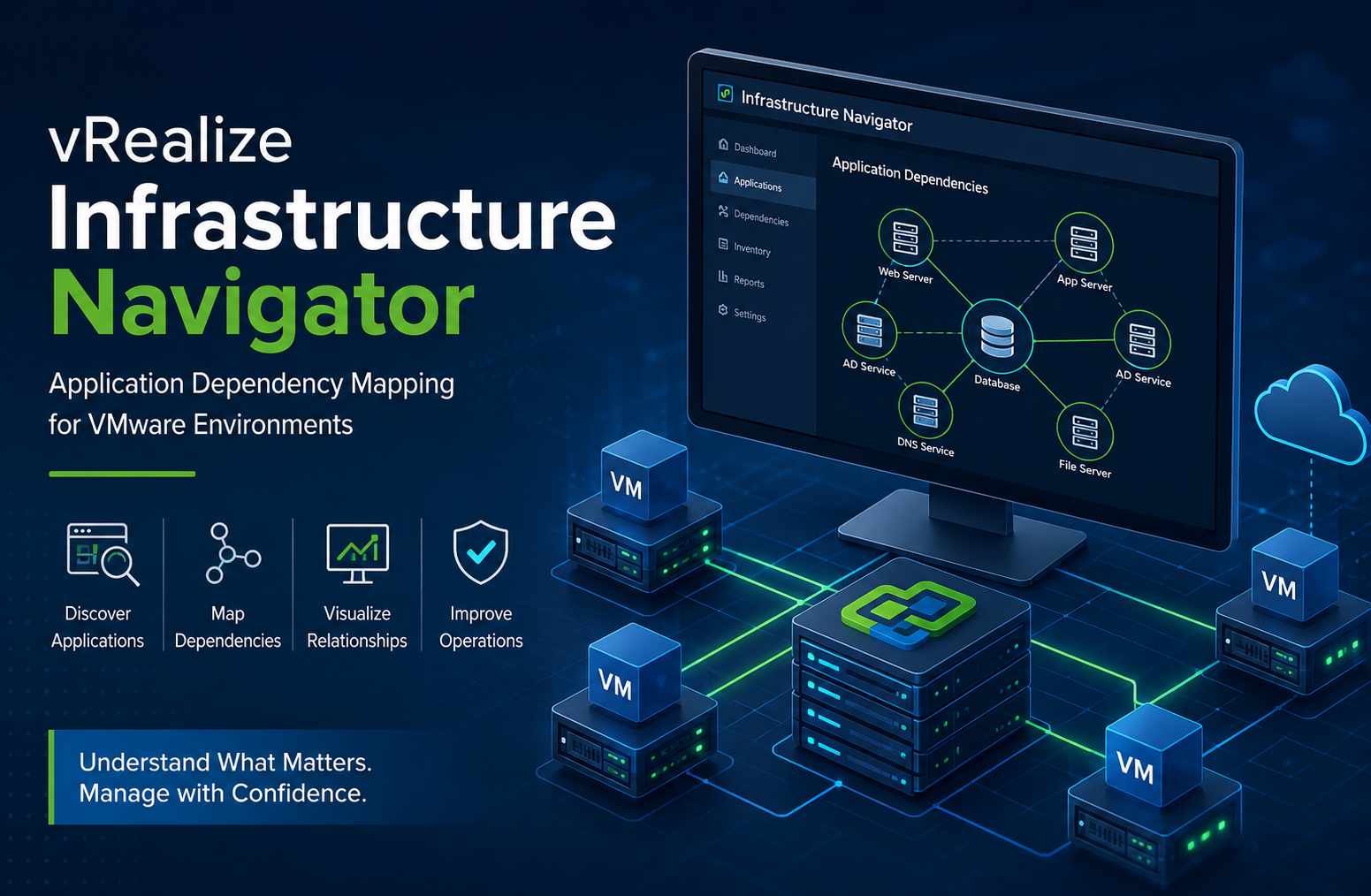
It was intended to discover application services and relationships within a VMware environment and present those dependencies through the vSphere management experience. Historical VMware material describes Infrastructure Navigator as an application-awareness solution that could automatically discover application services, visualize relationships, and map application dependencies.
This made the product particularly useful when administrators needed to understand infrastructure from an application perspective rather than simply from a hardware or virtual-machine perspective.
vRealize Infrastructure Navigator and Its Original Purpose
The product was originally known as vCenter Infrastructure Navigator before VMware later used the vRealize branding.
That naming history matters because technical documentation, old VMware environments, forum discussions, and support records may use several names for essentially the same technology.
You may encounter:
- vCenter Infrastructure Navigator
- VMware Infrastructure Navigator
- vRealize Infrastructure Navigator
- VIN
- vCIN
- Infrastructure Navigator
These references can be confusing when researching a legacy VMware environment.
Broadcom’s current knowledge base still identifies the product as “VMware vRealize Infrastructure Navigator” and notes that it was formerly known as vCenter Infrastructure Navigator.
The product was aimed at organizations that needed more context about their virtualized applications.
Instead of looking at infrastructure as a collection of independent VMs, administrators could use dependency information to understand relationships between workloads.
That was especially valuable during:
- Application troubleshooting
- Data center migrations
- Disaster recovery planning
- Application impact analysis
- Virtual machine consolidation
- Infrastructure audits
- Dependency documentation
- Change planning
The underlying idea was simple but important: knowing that a VM is running is not the same as knowing what that VM means to the application.
How vRealize Infrastructure Navigator Worked
VIN was delivered as a VMware virtual appliance and integrated with vCenter Server.
Historical VMware documentation describes an architecture involving Infrastructure Navigator server and database components, together with a plug-in in the vSphere Web Client for viewing and analyzing dependencies.
At a high level, the workflow looked like this:
- Deploy the Infrastructure Navigator appliance.
- Register it with vCenter Server.
- Allow the product to communicate with the relevant VMware infrastructure.
- Discover services running inside virtual machines.
- Establish relationships between discovered services.
- Present dependency information through the VMware management interface.
- Use the resulting information for operational analysis.
This was different from manually maintaining spreadsheets that listed which application belonged to which VM.
Manual dependency records have a fundamental weakness: they become outdated quickly.
A server may be repurposed, an application may move to another VM, a database may be migrated, or a new service may be introduced without anyone updating the documentation.
Automated discovery was therefore one of the most useful concepts behind VIN.
Application Dependency Mapping Explained
Application dependency mapping is easier to understand with a practical example.
Imagine an internal employee portal.
The portal might contain:
- A web server
- An application server
- A database server
- An authentication service
- A DNS service
- A file server
An infrastructure administrator looking only at VMware inventory might see six unrelated virtual machines.
From the application’s perspective, however, they form a chain.
The web tier depends on the application tier.
The application tier depends on the database.
The application may depend on Active Directory for authentication.
Several components may also depend on DNS.
If the database becomes unavailable, the web server could remain powered on while the actual business application becomes unusable.
This is where dependency mapping becomes operationally valuable.
Instead of asking:
“Is the VM powered on?”
the administrator can ask:
“What application functionality will be affected if this VM becomes unavailable?”
That is a much more useful question during infrastructure changes.
Why Dependency Visibility Matters
Infrastructure teams often know their servers extremely well but have less visibility into application relationships.
This problem becomes worse as environments grow.
A small VMware environment might contain 20 virtual machines. An enterprise environment may contain hundreds or thousands.
At that scale, relying on memory is dangerous.
Dependency information can help administrators identify:
- Upstream dependencies
- Downstream dependencies
- Shared infrastructure services
- Application tiers
- Potential single points of failure
- Services affected by maintenance
- Workloads that should be migrated together
The value is not simply producing a diagram.
The real value is improving the quality of infrastructure decisions.
A dependency map can turn an infrastructure change from a guess into an evidence-based decision.
Key Benefits of vRealize Infrastructure Navigator
Better Application Visibility
VIN attempted to bridge the gap between infrastructure inventory and application awareness.
A VMware administrator could see more context around the workloads running inside the virtual environment.
This was particularly useful when server names did not clearly explain their purpose.
Dependency Discovery
One of the product’s defining capabilities was application dependency mapping.
Instead of manually documenting relationships, administrators could use discovered service information to build a clearer picture of application architecture.
Faster Troubleshooting
When an application stopped working, administrators could use dependency information to investigate related infrastructure.
For example, if an application server was operational but the application was unavailable, the dependency chain could help direct investigation toward the database, authentication service, or another supporting component.
This does not eliminate troubleshooting, but it can reduce the amount of blind searching.
Change Impact Analysis
Before shutting down or migrating a VM, administrators need to know whether something depends on it.
A server that appears insignificant in the inventory could actually support several applications.
Dependency information helps expose those relationships.
Migration Planning
Application dependency mapping can also help with workload migration.
Suppose an organization wants to move a group of VMs from one cluster to another.
Moving individual VMs without understanding dependencies can create unnecessary service interruptions.
Dependency information can help identify groups that should be considered together.
Disaster Recovery Planning
Dependency knowledge is particularly valuable when building recovery plans.
A disaster recovery plan should not merely identify which virtual machines need protection.
It should consider the order and relationships of the application components.
For example, restoring an application server without its database may not produce a usable application.
Dependency mapping helps provide the context needed for that type of planning.
Architecture of the Legacy Platform
The original architecture was centered around VMware infrastructure and the vSphere management environment.
The appliance model separated the discovery functionality from the vSphere Web Client interface.
Historical documentation identifies:
- A server component
- A database component
- A vSphere Web Client plug-in
The server processed discovery information, while the database stored discovery and configuration information. The plug-in provided the graphical interface used to view and analyze dependencies.
Communication requirements also reflected its architecture.
Broadcom’s support documentation lists historical VIN communication involving vCenter Server, ESXi hosts, virtual machines, and the vSphere Web service APIs. It also documents ports associated with discovery and plug-in connectivity.
That information can still be useful when troubleshooting an inherited legacy installation.
However, administrators should not interpret old port documentation as evidence that the product is suitable for a current production deployment.
Architecture documentation is not the same thing as current product support.
The Most Important Fact: It Is a Legacy Product
This is the section that matters most if you are researching VIN for practical use.
vRealize Infrastructure Navigator is not a current VMware product.
Historical lifecycle records place Infrastructure Navigator 5.8.x at the end of its distribution and support lifecycle in September 2017. Contemporary technical discussions from VMware professionals also documented that the product was no longer available for download and had reached End of Distribution and End of Support Life.
That means a search result telling you how to deploy an old VIN appliance should not automatically be interpreted as a recommendation to deploy it today.
There is a major difference between:
“This is how the product worked.”
and
“This is a supported way to manage a modern VMware environment.”
The first is historically useful.
The second is not a safe assumption.
Why VMware Infrastructure Navigator Was Retired
VIN depended heavily on VMware technologies that evolved over time.
One important issue involved the VMware VIX API.
Historical support information indicates that VIN used VIX-related functionality for discovery. A security issue involving the vCenter Server VIX API resulted in changes that affected VIN’s operation. VMware administrators were subsequently directed toward the Service Discovery Management Pack as a replacement for VIN functionality.
This illustrates an important infrastructure lesson.
A product can become obsolete not because its basic idea is bad, but because the underlying interfaces it depends on change.
VIN’s concept of application dependency mapping remained useful.
Its implementation was tied to an older VMware architecture.
As VMware moved toward newer management interfaces, operating models, and application monitoring capabilities, maintaining the old appliance became increasingly impractical.
Security Considerations
Security is one of the strongest reasons not to treat an unsupported legacy appliance as a modern monitoring solution.
An old product can introduce several concerns:
- No current feature development
- No normal modern lifecycle
- Compatibility limitations
- Historical security vulnerabilities
- Dependence on obsolete VMware components
- Difficulty obtaining current technical support
- Problems integrating with current infrastructure
Historical security material shows that Infrastructure Navigator versions were involved in VMware security advisories and that later VIN releases were issued in the older product era.
If VIN exists in an inherited environment, the correct question is not simply:
“Does it still work?”
The better questions are:
- Is it supported?
- Is it necessary?
- What systems does it depend on?
- What security exposure does it create?
- What functionality does it provide that cannot be obtained elsewhere?
- What is the migration path?
Those questions produce a much more useful infrastructure assessment.
Can You Still Use vRealize Infrastructure Navigator?
Technically, you may encounter existing VIN deployments in old VMware environments.
That does not mean you should introduce a new deployment.
If an organization has inherited a legacy environment containing VIN, administrators should document the deployment and evaluate it as part of modernization work.
Before making changes, identify:
- VIN version
- vCenter Server version
- ESXi versions
- VMware Tools versions
- Network dependencies
- Authentication configuration
- Registered vSphere integrations
- Applications relying on its dependency information
- Existing documentation
- Replacement monitoring capabilities
Do not assume that an old appliance will behave correctly after a vCenter or ESXi upgrade.
Historical troubleshooting documentation already shows compatibility problems involving changes to IP configuration, VMware Tools compatibility, DHCP, and vCenter authentication.
That is exactly why legacy software should be approached as a controlled migration concern rather than ordinary production infrastructure.
What Replaced vRealize Infrastructure Navigator?
VMware introduced the Service Discovery Management Pack as a replacement for VIN’s service discovery role.
The technology later became associated with VMware’s vRealize Operations and subsequently VMware Aria Operations ecosystem.
The naming has changed again in the Broadcom era.
Current Broadcom documentation places Service Discovery within VCF Operations, while also documenting environments involving VMware Aria Operations 8.x and VCF Operations 9.x.
This distinction is important because many online articles use old product names.
The underlying operational concept, however, remains recognizable:
Discover services running in virtual machines and use that information to improve application and infrastructure visibility.
Current VCF Operations documentation also exposes Service Discovery through vCenter integrations, confirming that service discovery remains part of the modern VMware operations architecture.
Service Discovery Versus the Old VIN Model
It is tempting to describe the modern platform as an exact technical replacement for VIN.
That would be too simplistic.
The better way to understand it is as an evolution of the same operational requirement.
VIN was strongly associated with the older vSphere Web Client and appliance architecture.
Modern service discovery is integrated into a newer operations platform.
That gives administrators access to a broader management environment rather than a standalone legacy dependency-mapping appliance.
The modern approach can combine service discovery with other operational information.
This matters because application troubleshooting rarely stops at dependency discovery.
An administrator may also need:
- Performance metrics
- Capacity information
- Alerts
- Configuration data
- Application monitoring
- Operating system information
- Logs
- Remediation workflows
Modern operations platforms are designed around this broader operational context.
How Modern Service Discovery Works
Current Broadcom documentation shows Service Discovery available within VCF Operations and describes configuration through vCenter integrations.
The modern architecture can also expose service discovery configuration through APIs.
Broadcom’s VCF Operations API documentation shows that vCenter integration can include Service Discovery configuration and that corresponding Service Discovery adapters can be created as part of the integration.
This is significant for larger environments.
Modern infrastructure management increasingly depends on automation.
Instead of configuring every component manually, organizations can use APIs and repeatable configuration processes.
That makes the modern approach much more suitable for standardized enterprise operations.
Service Discovery Is Not the Same as Full Observability
One common mistake is to assume that service discovery automatically equals application observability.
It does not.
Service discovery answers questions such as:
- What services exist?
- Where are they running?
- What relationships can be identified?
Observability goes further.
It asks:
- Is the application healthy?
- Why is it slow?
- Which dependency is causing the problem?
- What changed?
- Which users are affected?
- What happened immediately before the failure?
Dependency mapping is therefore one layer of application awareness, not the entire monitoring strategy.
This distinction is important when evaluating alternatives to a legacy platform.
If your original reason for using VIN was simply to understand which VMs were connected, service discovery may address much of that requirement.
If you need full application performance monitoring, network analytics, distributed tracing, logs, and deep application diagnostics, you need a broader observability strategy.
Practical Use Cases for Dependency Mapping
Data Center Migration
Suppose an organization is moving workloads between clusters or data centers.
The infrastructure team needs to know which workloads belong together.
Dependency mapping can help identify application components that should be considered as a group.
Server Retirement
A VM may look unused because nobody logs into it.
That does not prove that the VM is unnecessary.
It may provide a background service for another application.
Before retirement, dependency information can help validate whether other workloads communicate with the server.
Disaster Recovery
A recovery plan based solely on VM names can be incomplete.
Dependency relationships can help identify application tiers and supporting services.
This can improve the quality of recovery sequencing.
Troubleshooting
When an application fails, administrators can begin with the application dependency chain instead of examining every VM in the environment.
That can reduce the investigation scope.
Security Segmentation
Dependency information can help security teams understand which systems communicate with one another.
This can support segmentation discussions and firewall policy planning.
It should not, however, be treated as a substitute for dedicated network security analysis.
Application Ownership
Infrastructure teams sometimes inherit VMs with unclear ownership.
Dependency data can help reveal what a workload actually supports, making it easier to identify the relevant application or operations team.
Common Problems With Legacy VIN Deployments
Compatibility Problems
Older software depends on older interfaces.
A modern vSphere environment can therefore create compatibility issues for a VIN appliance.
Unsupported Components
Even if the appliance still starts, that does not make the deployment supported.
Support status matters when an organization depends on infrastructure for business-critical services.
Incomplete Discovery
Automated discovery is never a guarantee that every application relationship will be detected.
Custom services, unusual configurations, communication patterns, permissions, and technology changes can produce incomplete results.
Credential and Permission Issues
Discovery systems need appropriate access to gather information.
Current Service Discovery documentation demonstrates that credentials and permissions remain operationally important in modern implementations. For example, changing vCenter adapter credentials can result in service objects showing an unknown status when the account lacks required permissions.
This is an important operational lesson:
When discovery stops working, do not immediately assume that the discovery engine is broken.
Check credentials and permissions first.
Network Connectivity
Discovery components must communicate with the systems they inspect.
Firewall rules, DNS, certificates, ports, routing, and authentication can all affect discovery.
Historical Broadcom documentation lists the network ports used by VIN for communication with vCenter and ESXi systems.
How to Troubleshoot a Legacy Installation
If you have inherited an existing deployment, start with documentation rather than immediately changing configuration.
Step 1: Identify the VIN Version
Determine exactly which release is installed.
Version information affects compatibility and troubleshooting.
Step 2: Document vCenter and ESXi Versions
VIN’s behavior cannot be evaluated independently of the VMware infrastructure around it.
Record:
- vCenter version
- ESXi version
- VMware Tools versions
- Guest operating systems
- VIN version
Step 3: Check Network Connectivity
Verify connectivity between:
- VIN
- vCenter Server
- ESXi hosts
- Relevant virtual machines
Also check firewalls and DNS.
Step 4: Check Authentication
Review the credentials used for discovery.
Make sure accounts have the required privileges and have not expired.
Step 5: Check VMware Tools
Historical VIN documentation identifies VMware Tools compatibility as a possible discovery failure point.
Step 6: Check vCenter Integration
If the plug-in disappears or dependency information stops updating, investigate the vCenter integration rather than assuming the database is corrupted.
Step 7: Plan Replacement
Even if the legacy deployment can be repaired, determine whether keeping it provides enough value to justify the operational and security risk.
In most modernization projects, the better long-term answer is migration.
A Better Migration Strategy
Replacing a legacy dependency-mapping system should be treated as an information migration problem, not simply a software installation.
Start by identifying what information the old system actually provides.
Create a list of:
- Critical applications
- Application tiers
- Known dependencies
- Business owners
- Infrastructure owners
- Recovery requirements
- Migration groups
- Existing monitoring requirements
Then determine which of those requirements can be handled by current VCF Operations capabilities and which require other monitoring or observability products.
This approach avoids a common mistake: replacing a product without replacing the operational process around it.
The software is rarely the real asset.
The knowledge about the environment is the asset.
What Administrators Should Do in 2026
If you are researching vRealize Infrastructure Navigator today, your next step depends on why you searched for it.
If You Found It in an Old VMware Environment
Document it and evaluate migration.
Do not assume that because it still operates, it remains a supported production component.
If You Are Looking for an Installation Download
Be cautious.
VIN is a retired product, and obtaining an old appliance from an unofficial source introduces additional security and integrity concerns.
If You Need Dependency Mapping
Look at current VCF Operations Service Discovery capabilities first.
Current Broadcom documentation confirms that Service Discovery is available in the modern VCF Operations environment.
If You Need Full Application Monitoring
Do not limit your evaluation to dependency mapping.
Assess application monitoring, infrastructure monitoring, logs, metrics, network visibility, and other observability requirements together.
If You Are Maintaining a Legacy VMware Environment
Use VIN documentation primarily as historical reference.
The goal should be understanding what the old system did and preserving useful operational knowledge while moving toward supported technology.
A Useful Decision Framework
A simple decision matrix can help.
| Situation | Recommended direction |
| Existing VIN in an old environment | Document and plan migration |
| New VMware deployment | Do not build around legacy VIN |
| Need basic VM service discovery | Evaluate current VCF Operations Service Discovery |
| Need application performance monitoring | Evaluate broader application monitoring |
| Need network flow visibility | Evaluate dedicated network observability |
| Need historical dependency information | Preserve and validate existing VIN data |
| VIN fails after infrastructure upgrades | Treat compatibility as a likely factor |
| Security-sensitive production environment | Prioritize supported software |
The important principle is to match the tool to the operational requirement rather than searching for a one-to-one replacement based only on product names.
Important Lessons From VIN
There are several broader infrastructure lessons hidden inside the history of this product.
Application Context Is More Valuable Than Inventory Alone
Knowing that a VM exists is useful.
Knowing what that VM supports is far more useful.
Dependency Data Should Be Maintained as Operational Knowledge
Dependency maps should not be created once and forgotten.
Applications change.
Infrastructure changes.
Dependencies change.
Any organization relying on dependency mapping should periodically validate its information.
Legacy Tools Can Remain Useful Without Remaining Supported
Historical software can still be valuable for understanding an old environment.
That does not mean it should remain in production indefinitely.
This distinction is especially important for infrastructure teams inheriting systems built by previous administrators.
Product Names Can Obscure Technology Evolution
vCenter Infrastructure Navigator, vRealize Infrastructure Navigator, VMware Aria Operations, and VCF Operations belong to different points in VMware’s product evolution.
Searching only by the old name can make modern documentation difficult to find.
Understanding the underlying capability is more effective than relying on branding.
Frequently Asked Questions
Is vRealize Infrastructure Navigator still supported?
No. Infrastructure Navigator is a legacy VMware product. Historical lifecycle information places the 5.8.x product line at End of Distribution and End of Support Life in September 2017.
What did vRealize Infrastructure Navigator do?
It provided application awareness and dependency mapping within VMware virtual infrastructure. It was designed to discover services and help administrators understand relationships between applications and virtual machines.
What replaced vRealize Infrastructure Navigator?
VMware introduced the Service Discovery Management Pack as a replacement for VIN’s service discovery functionality. Service Discovery is now documented within the VCF Operations and VMware Aria Operations product evolution.
Can VIN be used with modern VMware environments?
VIN should not be treated as a supported solution for modern VMware deployments. It was retired years ago, and its historical architecture depended on older VMware interfaces and components.
Is dependency mapping the same as application monitoring?
No. Dependency mapping identifies relationships between services and workloads. Application monitoring goes further by measuring application health, performance, availability, and other operational signals.
Why do administrators still search for VIN?
Most searches come from people maintaining older VMware environments, reading legacy documentation, troubleshooting historical deployments, researching application dependency mapping, or looking for a replacement for an old VIN installation.
Conclusion
vRealize Infrastructure Navigator was an important VMware technology because it addressed a problem that traditional infrastructure inventory could not solve well: understanding the relationships between applications, services, and virtual machines.
Its value came from application context.
Instead of viewing a VMware environment as a collection of isolated workloads, VIN helped administrators understand how those workloads interacted. That made dependency information useful for troubleshooting, migration planning, disaster recovery, change impact analysis, and infrastructure documentation.
However, its historical usefulness should not be confused with current supportability. The product reached the end of its distribution and support lifecycle in 2017, and modern VMware environments have moved toward newer service discovery and operations capabilities.
For organizations that still encounter VIN, the best approach is to treat it as legacy infrastructure knowledge. Preserve useful dependency information, understand what the old deployment was doing, assess its risks, and move the underlying operational requirement toward supported technology.
Modern VCF Operations continues to provide Service Discovery capabilities, demonstrating that the need VIN originally addressed has not disappeared. The technology and management platform have evolved, but the fundamental operational question remains the same: what applications and services depend on this infrastructure?