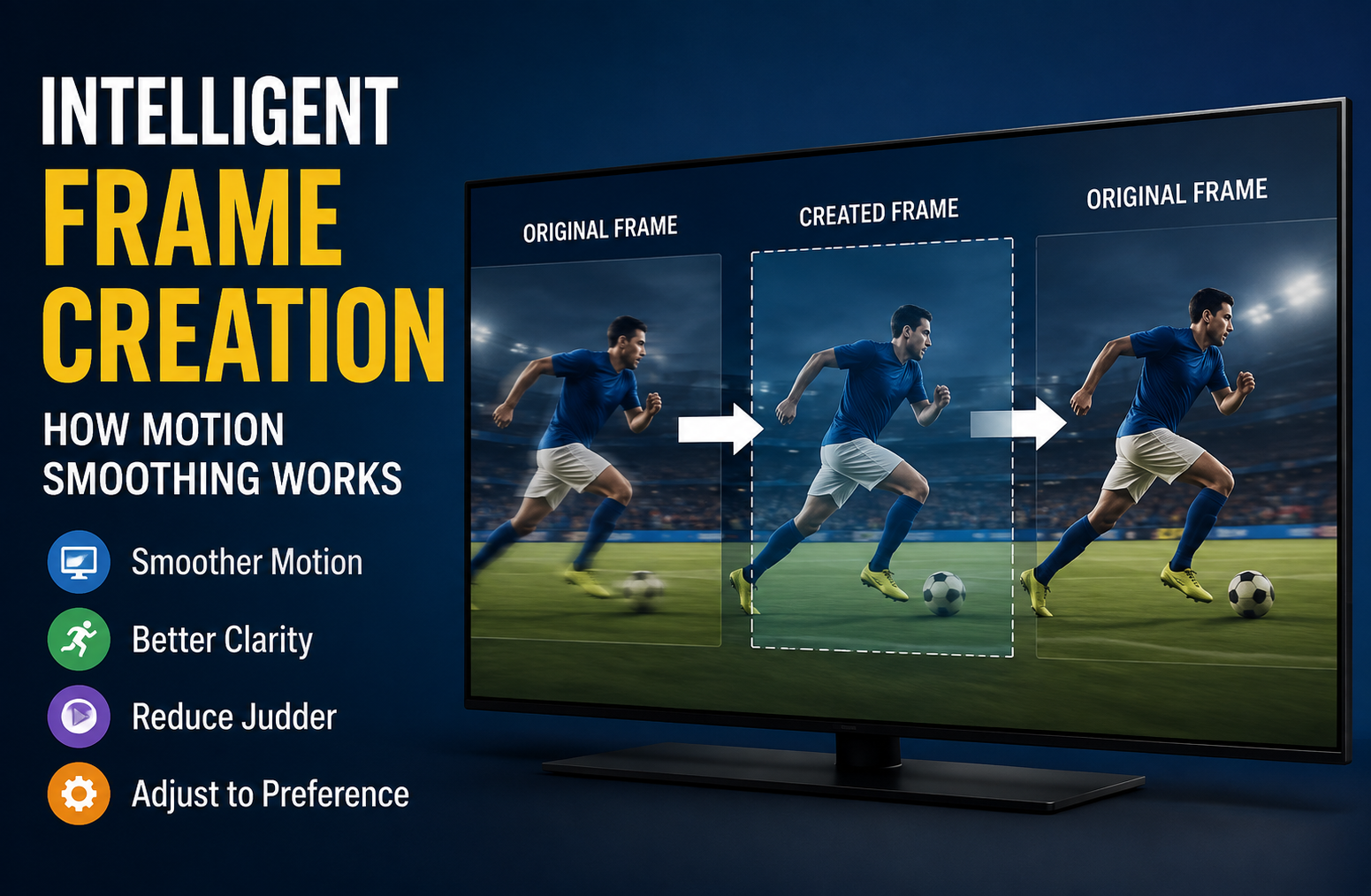
Intelligent Frame Creation: How Motion Smoothing Works
Intelligent Frame Creation is a motion-processing technology designed to make moving images appear smoother and more fluid on a television or compatible display. Instead of simply showing the frames contained in the original video signal, the system analyzes consecutive frames and creates additional frames between them. The result can be smoother camera movement, clearer action, and less noticeable judder, especially when lower-frame-rate content is displayed on a higher-refresh-rate screen.
The technology sounds simple, but the way it affects picture quality depends heavily on what you are watching. A setting that makes a football match look impressively fluid can make a cinematic movie look unnatural. Likewise, increasing motion processing does not automatically mean better picture quality. In many situations, a moderate setting or even turning the feature off can produce a more faithful image.
This guide explains what Intelligent Frame Creation does, how frame interpolation works, when it helps, when it can hurt picture quality, how to adjust it, and why the best setting depends on the type of content rather than simply choosing the highest available level.
What Is Intelligent Frame Creation?
Intelligent Frame Creation is a form of frame interpolation or motion compensation used by some television manufacturers. Its primary purpose is to reduce visible judder and improve the apparent smoothness of motion.
A video normally consists of a sequence of individual frames. For example, a movie may use 24 frames per second, while television programming can use different frame rates depending on the broadcast standard and source.
Imagine two consecutive frames:
- Frame 1 shows a football player on the left side of the screen.
- Frame 2 shows the player several inches farther to the right.
- The television analyzes both images.
- It estimates how the player and surrounding objects moved.
- It generates an intermediate image representing the estimated position between the two original frames.
That newly generated image is then displayed between the original frames.
The viewer therefore sees movement that appears more continuous.
Panasonic describes its Intelligent Frame Creation system as automatically compensating for picture frame rate and reducing judder to make images smoother. The manufacturer also notes that image noise can sometimes appear depending on the content. (Panasonic)
This is important because interpolation is not simply a matter of increasing the display’s physical refresh rate. The television is actually creating visual information that was not present in the original video.
How Intelligent Frame Creation Works
The process is considerably more sophisticated than simply duplicating frames.
1. The TV receives the original video
The television first receives a video signal from a streaming service, broadcast channel, Blu-ray player, game console, computer, or another source.
The source might contain relatively few frames compared with what the display is capable of showing.
2. The processor compares consecutive frames
The television’s image processor examines one frame and compares it with the next.
It searches for changes in:
- Object position
- Edges
- Shapes
- Background movement
- Camera movement
- Brightness changes
- Texture patterns
The processor then attempts to determine which parts of the image have moved and in what direction.
3. Motion is estimated
This stage is often called motion estimation.
Suppose a car appears in one location in the first frame and slightly farther along the road in the second. The processor estimates the car’s movement and predicts where it should appear in an intermediate frame.
This process becomes much harder when several objects overlap, disappear, rotate, or move at different speeds.
4. A new frame is generated
The television creates an intermediate image based on its motion calculations.
The generated frame is not an original frame from the source. It is a prediction.
That distinction explains both the benefit and the weakness of this technology.
When the prediction is accurate, motion can look remarkably smooth. When the prediction is wrong, visible artifacts can appear.
5. The display presents the processed sequence
The original and generated frames are then displayed according to the television’s processing strategy.
The exact implementation varies by manufacturer and model. Some televisions provide simple low, medium, and high settings, while others offer separate controls for film and camera motion.
Why Frame Interpolation Matters
A television can have a high refresh rate without automatically making every piece of content look naturally smooth.
A display’s refresh rate describes how frequently the panel can refresh. Frame interpolation is different because it concerns the creation of additional visual frames.
For example, a high-refresh-rate television may be capable of displaying much more frequent updates, but if the source contains fewer unique frames, there is still a limited amount of original motion information available.
Frame interpolation attempts to fill that gap.
This distinction is often misunderstood when people compare televisions based only on numbers printed on product specifications.
A higher refresh rate can be useful, but it does not mean every movie or television program should be artificially converted into extremely smooth motion.
Intelligent Frame Creation vs Refresh Rate
These two concepts are related but should not be treated as the same thing.
Refresh rate
Refresh rate describes the display hardware’s capability.
It is commonly expressed in hertz, or Hz.
A higher refresh rate can allow a display to present motion more frequently when suitable content is available.
Frame interpolation
Frame interpolation is a processing technique.
It creates additional frames by analyzing existing frames.
A television can therefore have sophisticated motion processing, but that does not change the fact that the original source may have been recorded at a lower frame rate.
This is one reason marketing terminology can become confusing. Different manufacturers use different names for motion technologies, and the advertised motion number does not always describe the same technical characteristic.
Intelligent Frame Creation for Movies
Movies are one of the areas where motion processing requires the most careful judgment.
Many traditional films are captured and presented at approximately 24 frames per second. That frame rate contributes to the characteristic cinematic appearance people associate with movies.
Turning motion smoothing up aggressively can make that cinematic appearance disappear.
The movement may become unusually fluid, creating what viewers commonly describe as the soap opera effect.
Samsung, for example, explains that motion smoothing can look attractive for live programming such as sports, while many movies are produced at 24 frames per second and may not look natural with aggressive motion smoothing. (Samsung India)
Why movies can look strange
Consider a slow camera movement across a city landscape.
Without aggressive interpolation, the movement retains the visual character intended by the source.
With strong interpolation, the television may make the camera movement appear unusually smooth. Characters can also appear to move with a more immediate, video-like quality.
Some viewers enjoy this.
Others find it distracting.
Neither response is technically wrong. Picture preference is partly subjective.
Recommended approach for movie watching
If your priority is cinematic accuracy:
- Start with motion processing turned off or at a low level.
- Watch several scenes with slow camera movement.
- Pay attention to faces and objects crossing the screen.
- Increase processing gradually if judder bothers you.
- Stop increasing it as soon as artifacts or an artificial appearance become noticeable.
The goal should not be maximum smoothness.
The goal should be appropriate motion.
Intelligent Frame Creation for Sports
Sports are often a much better match for motion smoothing.
Football, basketball, tennis, hockey, cricket, racing, and other fast-moving events contain rapid camera pans and moving subjects.
Without sufficient motion handling, you may notice:
- Blurring
- Judder
- Unclear players
- Difficulty following fast objects
- Reduced clarity during camera pans
Motion processing can make these situations easier to follow.
This is one reason manufacturers commonly position motion enhancement as useful for live sports. Samsung’s current support information similarly describes motion enhancement as particularly useful for moving objects and live sports on supported models. (Samsung India)
A practical sports setting
For sports, a medium setting is often a sensible starting point.
If players remain blurry, increase the setting gradually.
If you begin seeing strange outlines around players or the field, reduce it.
The highest setting is not automatically the best setting.
Intelligent Frame Creation for Television Shows
Regular television programming sits somewhere between movies and sports.
Talk shows, news broadcasts, reality programs, documentaries, dramas, and live programming can respond differently to motion processing.
For ordinary television viewing, a low or medium setting may provide a useful compromise.
However, some programs already contain motion characteristics that the television handles well without additional processing.
The best approach is therefore to evaluate the actual content you watch most often.
If you primarily watch:
- News
- Live broadcasts
- Sports
- Reality shows
You may prefer more motion processing.
If you primarily watch:
- Movies
- Prestige dramas
- Cinematic documentaries
- Filmmaker-focused content
You may prefer less.
Intelligent Frame Creation for Gaming
Gaming is a particularly important exception.
Traditional frame interpolation can introduce processing delay because the television needs time to analyze frames and generate new ones.
For competitive gaming, latency matters.
A player may notice a difference between pressing a controller button and seeing the corresponding action on the screen.
This is why gaming modes often disable or restrict motion-processing features.
Panasonic documentation, for example, specifies conditions in which Intelligent Frame Creation is unavailable, including certain low-latency and gaming configurations. (Panasonic Support)
Why gamers should be cautious
For single-player cinematic games, some additional processing may seem attractive.
For competitive games, however, responsiveness generally matters more than artificial smoothness.
A sensible gaming setup is usually:
- Enable Game Mode.
- Keep unnecessary image processing low.
- Use the console or PC’s native frame output where possible.
- Prioritize low input latency.
- Adjust motion processing only if your specific display and gaming setup support it without compromising responsiveness.
The Benefits of Intelligent Frame Creation
When used appropriately, frame interpolation can provide several noticeable advantages.
Smoother camera movement
Slow horizontal or vertical camera movements can appear more fluid.
This is particularly useful when watching live television and sports.
Reduced judder
Judder is a form of uneven motion that can become noticeable when lower-frame-rate content is displayed.
Motion processing attempts to compensate for this unevenness.
Better perceived motion clarity
Fast-moving objects may appear easier to follow when the television handles motion effectively.
Improved sports viewing
A fast-moving ball, player, racing vehicle, or puck can be easier to track.
Greater flexibility
Modern televisions often allow users to adjust motion processing rather than forcing one setting for everything.
That makes it possible to use different levels for different viewing situations.
The Problems Intelligent Frame Creation Can Cause
The technology has real limitations.
Understanding these limitations is essential if you want to get the best picture quality.
Soap Opera Effect
The most common complaint is the soap opera effect.
The image can appear excessively smooth and lose the visual character associated with film.
This is not necessarily a defect in the television.
It is often the expected result of aggressive interpolation.
Motion Artifacts
The processor is making predictions.
Predictions can be wrong.
When that happens, you might see:
- Strange outlines
- Warped objects
- Flickering details
- Double edges
- Distorted faces
- Unnatural movement
- Objects appearing to bend or break
These errors can be especially visible around complicated moving objects.
Haloing
Some systems can produce visible borders around moving subjects.
A player running across a football field may appear to have a faint outline around the body.
This can become more noticeable at stronger processing levels.
Background Distortion
A moving subject can confuse the processor when it crosses a detailed background.
For example, imagine a tennis player moving in front of advertising boards.
The processor must determine which pixels belong to the player and which belong to the background.
If it miscalculates, parts of the background may temporarily appear distorted.
Increased Processing
Motion interpolation requires image analysis.
That means the television has to perform additional processing before displaying the final result.
For normal television viewing this may not be a concern.
For gaming and latency-sensitive applications, it can be much more important.
Why Higher Settings Are Not Always Better
One of the biggest mistakes users make is assuming that maximum motion processing must provide the best image.
It does not.
A maximum setting generally asks the television to perform more aggressive motion manipulation.
That may produce smoother movement, but it can also increase the chance of artifacts and an artificial appearance.
Think of the control as a preference adjustment rather than a picture-quality scale.
Maximum does not mean maximum accuracy.
It means stronger processing.
A lower setting can actually be better if it provides enough motion improvement without introducing visible problems.
What Do Min, Mid, Max, and Off Mean?
The exact behavior differs by television model, but the basic idea is usually straightforward.
Off
The television does not apply the manufacturer’s motion interpolation feature.
This is often preferred for preserving the original appearance of movies.
Min
A relatively subtle amount of motion processing is applied.
This can be a good starting point if you dislike excessive smoothing.
Mid
A stronger level of interpolation is applied.
This can work well for general television and sports.
Max
The television applies its strongest available processing.
It may create very smooth movement but can also make artifacts and the soap opera effect more obvious.
Some modern Panasonic televisions also provide a Custom mode that lets users separately adjust aspects such as blur reduction and film smoothness. (Panasonic Support)
How to Choose the Right Setting
There is no universal best setting.
Instead, choose according to three factors:
- What you are watching
- What artifacts you can see
- Whether you want cinematic accuracy or maximum smoothness
A useful starting framework looks like this:
| Content | Suggested Starting Point |
| Movies | Off or Low |
| Cinematic TV dramas | Off or Low |
| Sports | Medium |
| Live television | Low or Medium |
| News | Low or Medium |
| Animation | Low |
| Gaming | Off/Game Mode |
| Competitive gaming | Off/Game Mode |
| Fast action content | Low or Medium |
These are starting points rather than universal rules.
Different television processors behave differently, so personal testing remains important.
How to Test Intelligent Frame Creation Properly
Changing a setting for ten seconds is usually not enough to judge it.
Instead, use a repeatable test.
Step 1: Choose familiar content
Pick a movie, sports broadcast, or show you know well.
Familiar content makes differences easier to notice.
Step 2: Find a difficult motion scene
Look for:
- A slow camera pan
- A person walking across the screen
- Fast sports action
- A car moving through a detailed background
- Text moving across the screen
Step 3: Start with the feature off
Watch the scene carefully.
Look for judder and blur.
Step 4: Turn on the lowest setting
Watch the same type of movement again.
Ask yourself whether the improvement is actually visible.
Step 5: Increase one level
Continue comparing.
Stop when the picture begins to look artificial or artifacts become visible.
This approach is much more reliable than simply choosing the highest option.
Intelligent Frame Creation and Blur Reduction
Blur and judder are related, but they are not identical problems.
This distinction matters because some televisions offer separate controls for different aspects of motion.
Motion blur
Motion blur refers to a moving object becoming less distinct as it travels across the screen.
Judder
Judder refers to uneven or stuttering-looking motion, often associated with the relationship between the source frame rate and display timing.
A television may provide separate controls for these issues.
For example, Panasonic’s current documentation describes separate Blur Reduction and Film Smooth controls within its Custom Intelligent Frame Creation settings. (Panasonic Support)
This can be useful because you may want to reduce camera-motion judder without applying extremely aggressive processing to every moving object.
Common Mistakes When Using Motion Processing
Mistake 1: Always using Maximum
Maximum processing can introduce artifacts and an overly smooth appearance.
Use it only if you actually prefer the result.
Mistake 2: Using the same setting for everything
Movies and sports have different motion requirements.
A single setting is unlikely to be ideal for every type of content.
Mistake 3: Ignoring Game Mode
If gaming responsiveness is important, unnecessary processing can work against your goal.
Mistake 4: Judging only static images
Motion processing affects moving images.
A paused picture may look identical regardless of the setting.
Always evaluate actual movement.
Mistake 5: Confusing refresh rate with interpolation
A high refresh rate and frame interpolation are different technologies.
A television can have a high-refresh-rate panel without needing aggressive artificial frame creation.
Does Intelligent Frame Creation Improve Picture Quality?
The honest answer is: sometimes.
It improves motion presentation, not necessarily overall image quality.
A television with motion processing enabled may make movement smoother while simultaneously making a movie look less natural.
That is why it is better to think of the technology as a specialized processing tool.
It can solve a motion problem.
It does not automatically improve every aspect of the picture.
Color accuracy, contrast, black levels, resolution, HDR performance, viewing angle, and source quality are separate considerations.
Does It Create Real Frames?
No.
The additional frames are computationally generated.
The television analyzes available frames and predicts what an intermediate frame should look like.
This distinction is important because the processor cannot recover information that was never captured.
If an object is completely hidden in one frame and suddenly appears in another, the television has to make an educated prediction about what happened between those frames.
That prediction can be excellent in simple situations.
It can fail in complex ones.
Why Fast and Complex Scenes Are Difficult
Motion estimation becomes increasingly difficult when several things happen simultaneously.
Imagine a football match where:
- The camera is panning.
- Players are running in different directions.
- The crowd is moving.
- A player crosses another player.
- A ball travels rapidly through the scene.
- The background contains detailed advertising.
The processor must separate all these movements.
This is an extremely difficult image-processing problem.
When it succeeds, the result can look smooth.
When it fails, artifacts become visible.
This explains why you might see perfect motion in one scene and strange distortion only seconds later.
Is Intelligent Frame Creation Good for 4K Content?
4K resolution and motion processing solve different problems.
4K provides a higher-resolution image.
Frame interpolation modifies how movement is displayed.
A 4K movie can therefore benefit from carefully controlled motion processing, but 4K itself does not require frame interpolation.
Likewise, turning motion processing on does not make a video 4K.
These technologies should be evaluated separately.
What About HDR?
HDR adds another layer of complexity.
HDR content contains a wider range of brightness and color information, but motion interpolation still has to analyze the movement between frames.
Depending on the television and content, aggressive processing can sometimes produce visible artifacts that are more noticeable because of the high contrast or bright highlights in HDR scenes.
For HDR movies, a conservative motion setting is often a sensible starting point.
For HDR sports, stronger motion processing may be more appealing.
Again, the content matters.
Can You Leave It On All the Time?
You can, but that does not mean you should.
If you personally enjoy extremely smooth motion and do not notice artifacts, keeping the feature enabled may be perfectly reasonable.
However, viewers who want movies to retain their original cinematic character may prefer to disable it for film content.
A practical solution is to use separate picture modes when your television supports them.
For example:
Movie mode: Low or Off
Sports mode: Medium
Game mode: Off or restricted by Game Mode
This gives you the advantages of motion processing without forcing every type of content through the same processing profile.
How Manufacturers Name Motion Processing
One reason television settings can be confusing is that manufacturers do not always use the same terminology.
Panasonic uses Intelligent Frame Creation on supported models.
Samsung uses terms such as Auto Motion Plus, Picture Clarity, and newer AI motion technologies depending on the product generation. (Samsung India)
Other manufacturers use different names for similar concepts.
The important thing is not the marketing name.
Look for settings related to:
- Motion
- Judder reduction
- Blur reduction
- Frame interpolation
- Motion smoothing
- Film smoothing
- Clear motion
The underlying goal is usually to control how the television handles movement.
Intelligent Frame Creation vs Motion Blur Reduction
These features can sound interchangeable, but they may operate differently.
Frame interpolation creates additional images between existing frames.
Motion blur reduction can use other techniques, including display timing or backlight behavior, depending on the television.
Some systems combine multiple techniques.
That means two televisions can have similarly named motion settings while producing noticeably different results.
When comparing TVs, real-world viewing tests are therefore more useful than comparing the names of their motion features.
When You Should Turn Intelligent Frame Creation Off
Turning it off is often worth considering when:
- You primarily watch movies.
- You dislike the soap opera effect.
- You notice halos around moving objects.
- Faces appear distorted during movement.
- Backgrounds warp around moving subjects.
- You play latency-sensitive games.
- You want the closest possible representation of the original source.
There is no disadvantage in turning it off if you prefer the resulting image.
The purpose of the feature is to give you another processing option, not to force you to use it.
When You Should Increase It
A stronger setting can make sense when:
- Sports look jerky.
- Camera pans appear uneven.
- Fast objects are difficult to follow.
- Live broadcasts contain distracting motion blur.
- You personally prefer smoother movement.
- Your television handles interpolation particularly well.
Increase the setting gradually rather than jumping directly from Off to Max.
Intelligent Frame Creation and the Soap Opera Effect
The soap opera effect deserves special attention because it is one of the most recognizable consequences of motion interpolation.
The term refers to the unusually smooth, video-like appearance that can occur when a film is processed heavily.
Why does it happen?
Traditional film presentation has a recognizable motion character.
Interpolation adds predicted frames and changes the temporal appearance of movement.
The image can therefore feel more like live video than a theatrical movie.
Some people dislike this immediately.
Others prefer it.
The important point is that it is a viewing preference created by motion processing, not evidence that the television is malfunctioning.
Does Turning It Off Make the TV Worse?
No.
Turning off frame interpolation does not reduce the physical resolution of the television.
It does not damage the panel.
It does not mean the television is operating incorrectly.
It simply tells the display to stop applying that particular motion-processing technique.
In some situations, turning it off can actually provide a more natural image.
How to Troubleshoot Strange Motion Artifacts
If your television produces unusual motion, try the following sequence.
First, lower the processing level
If the problem disappears, the motion algorithm was likely being pushed too aggressively for that content.
Next, try another source
Compare streaming video with broadcast television or another input.
If the problem occurs only on one source, the source format may be contributing to the issue.
Check Game Mode
If you are using a console or PC, enable the appropriate gaming mode and compare the result.
Try a different picture mode
Movie, Standard, Sports, and Game modes can use different processing settings.
Compare familiar content
Use a scene that you know normally looks correct.
This helps distinguish a content-specific issue from a television configuration problem.
The Role of Content Quality
Motion processing cannot fix every problem caused by poor source material.
If the original video has:
- Compression artifacts
- Severe blur
- Missing frames
- Poor encoding
- Camera shake
- Low resolution
the television may have limited information from which to generate a convincing intermediate frame.
Interpolation works best when the original frames contain enough clear information to establish reliable movement.
This is another reason premium motion processing cannot magically transform poor video into perfect video.
Intelligent Frame Creation in Older and Newer TVs
The general concept has existed for many years, but implementations have evolved.
Older systems often relied heavily on conventional motion estimation and compensation.
Newer processors can use more sophisticated image analysis and, on some models, AI-based processing.
However, newer does not automatically mean better for every viewer.
A modern algorithm can still create artifacts under difficult conditions.
The best system is the one that produces the motion appearance you actually prefer.
How to Evaluate a TV’s Motion Performance
If you are comparing televisions, do not judge motion performance from a product specification alone.
Watch several types of content.
Test slow pans
These reveal judder and uneven motion.
Test fast sports
Look for player clarity and object tracking.
Test faces
Faces moving across the screen can reveal interpolation artifacts quickly.
Test detailed backgrounds
Trees, fences, crowds, and patterned walls can expose processing errors.
Test subtitles and scrolling text
Artificial motion processing can sometimes affect moving text or fine details.
A television that performs well in one category may perform differently in another.
A Practical Motion Setting Strategy
Instead of searching for a single “perfect” value, create a simple personal system.
For movies
Start with Off.
If judder bothers you, try Low.
For television
Start with Low or Medium.
Adjust according to the program.
For sports
Start with Medium.
Increase it if fast movement remains unclear.
For gaming
Start with Game Mode and minimal processing.
Prioritize responsiveness.
For animation
Begin with Off or Low.
Some animation can reveal interpolation errors around sharp edges and rapidly moving characters.
This strategy takes only a few minutes to establish and is much more useful than blindly copying another person’s settings.
Frequently Asked Questions
What does Intelligent Frame Creation do?
It analyzes consecutive video frames and generates intermediate frames to make motion appear smoother and reduce judder.
Is Intelligent Frame Creation the same as increasing refresh rate?
No. Refresh rate describes the display’s ability to refresh, while frame interpolation creates additional predicted frames from existing video.
Should Intelligent Frame Creation be on or off?
It depends on the content and your preference. Low or Off is often preferable for movies, while Medium can be useful for sports and live programming.
Does Intelligent Frame Creation cause input lag?
Motion processing can add processing time, although the exact impact varies by television. Gaming modes commonly restrict or disable such processing to prioritize responsiveness.
Why does my movie look like a soap opera?
Aggressive motion interpolation can make film movement unusually smooth and video-like. Reducing or disabling the motion setting usually restores a more traditional cinematic appearance.
Can Intelligent Frame Creation remove all motion blur?
No. It can improve perceived motion smoothness and reduce certain types of blur or judder, but it cannot eliminate every source of motion blur or compensate perfectly for poor source material.
Conclusion
Intelligent Frame Creation is best understood as a motion-management tool rather than a universal picture-enhancement feature. Its job is to analyze movement between frames and create additional frames that can make motion appear smoother.
That can be extremely useful for sports, live broadcasts, and other fast-moving content. It can also be exactly what you do not want when watching a cinematic movie where natural film motion is part of the viewing experience.
The most important lesson is simple: more processing is not automatically better.
Start with a low setting, compare real content, and pay attention to both benefits and artifacts. If motion becomes easier to follow without looking artificial, the setting is doing its job. If you begin noticing halos, warped backgrounds, strange faces, or a soap opera appearance, reduce the processing.
Your television’s model, processor, panel, source material, and personal preferences all influence the final result. Rather than relying on a universal recommendation, treat motion processing as a tool that should be adjusted according to what is actually on the screen.